ALAN ZISMAN ON
TECHNOLOGY
Everyone loves an invitation, but....
By Alan Zisman © 2026-10-06
Like the title says, everyone loves an invitation. But recently, I started getting multiple email invitations from people I know, using a couple of different online invitation services. Here's an example (names blacked out):
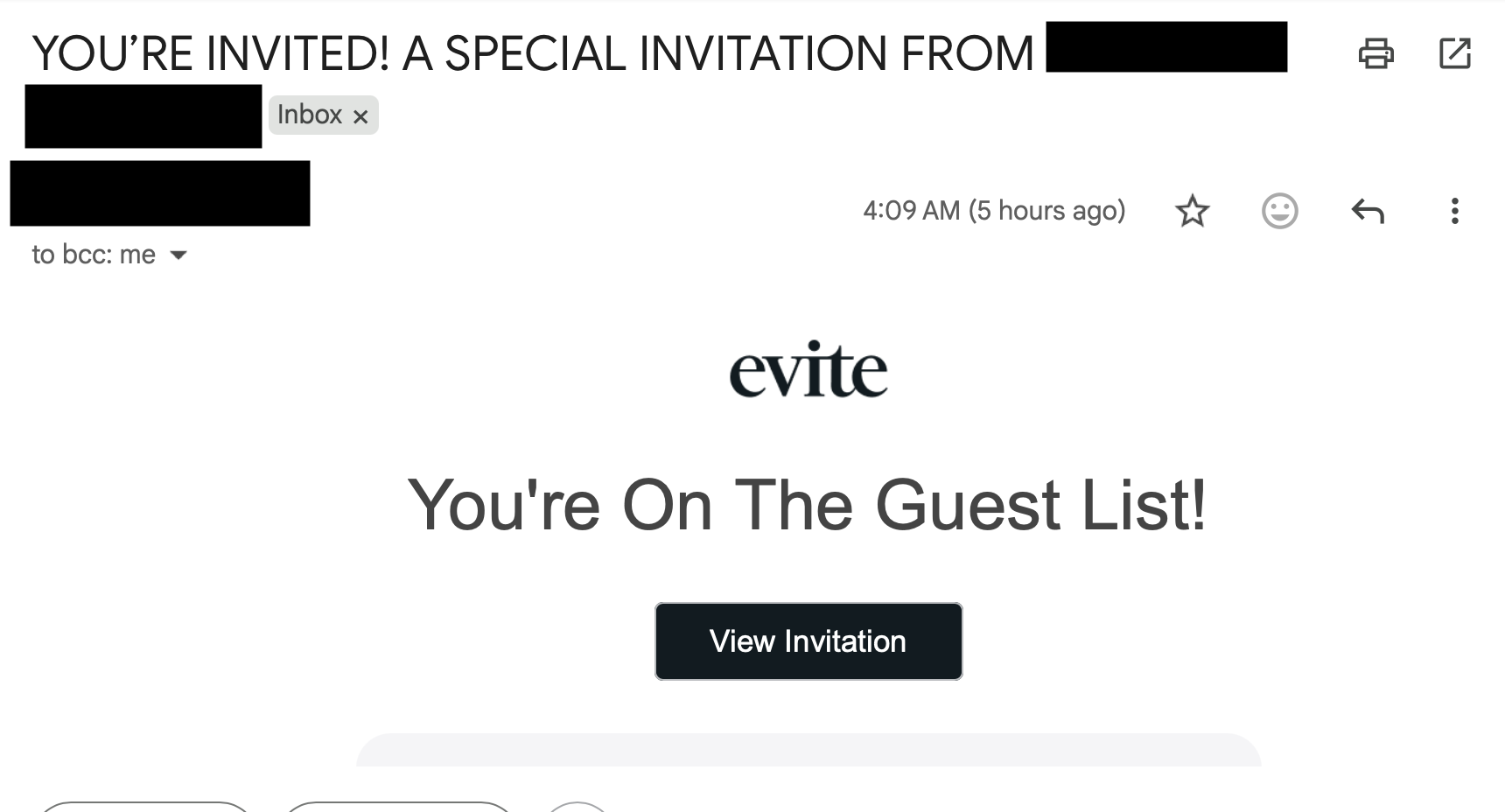
I found this a little puzzling - call me paranoid, but if someone I know is inviting a bunch of people, I would hope that in the body of the email - or in the 'front page' of the invitation card, it might include some details. What am I being invited to? A party? For what occasion? Dinner? Or?
And where is it being held? Date? Time?
No, no information unless I click on the View Invitation button.
Since I'm naturally suspicious, I emailed the sender and asked whether they'd sent out an invitation.
The reply: 'Nope'.
After I got 3 or 4 similar invitations within a day or two from different people I knew (most of whom, I knew, are friends of one another, both online and in real life), I started to suspect something was going on.
And then, almost immediately, I started hearing from these same people that they were no longer able to log into their Google accounts. (I do casual tech support for friends, family, and acquaintances).
OK. Let's see what we can find out.
First, let's look 'below the fold' on the emailed invitation:
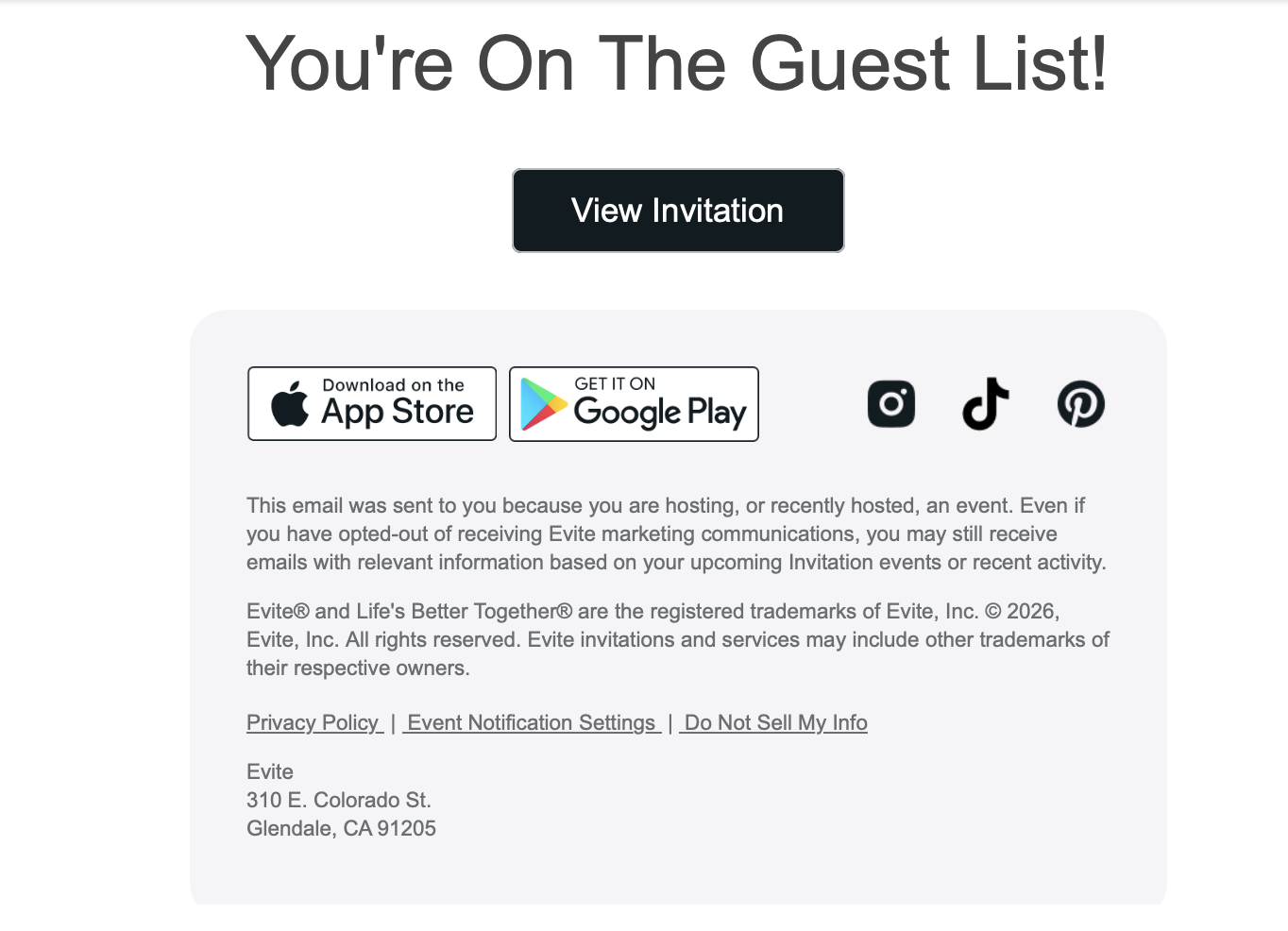
On a computer, in a web browser, if you hover your pointer over a link, you can see where the link is pointing - if I do that with the App Store, Google Play, Instagram (etc) buttons, they seem to point to the destinations we might expect. The Privacy Policy and other links on that line point to links at Evite.com as might be expected.
But the big button labelled View Invitation doesn't go to Evite.com - instead it goes some website named Ravenite.
Because I'm prepared to take some risks for my readers and for the people for whom I do tech support, I clicked the button anyway. It goes to what looks like a Google Account log in page, asking for my Google user name, and when I enter that, my password.
When other people got this invitation, many of them clicked on that button, saw what looked like a Google log in screen, and entered that information. But hold on a moment.
Why am I being asked to log into my Google account in order to view an invitation to a friend's party? At best, the party invitation service might want my email address in order to send me unwanted spam emails. But they don't need my Google password for that - just the address.
And if we look at the top of the web browser window, we see the address - it's not a Google log in page, again, it's a Ravenite page - apparently capturing my Google log in name and password:
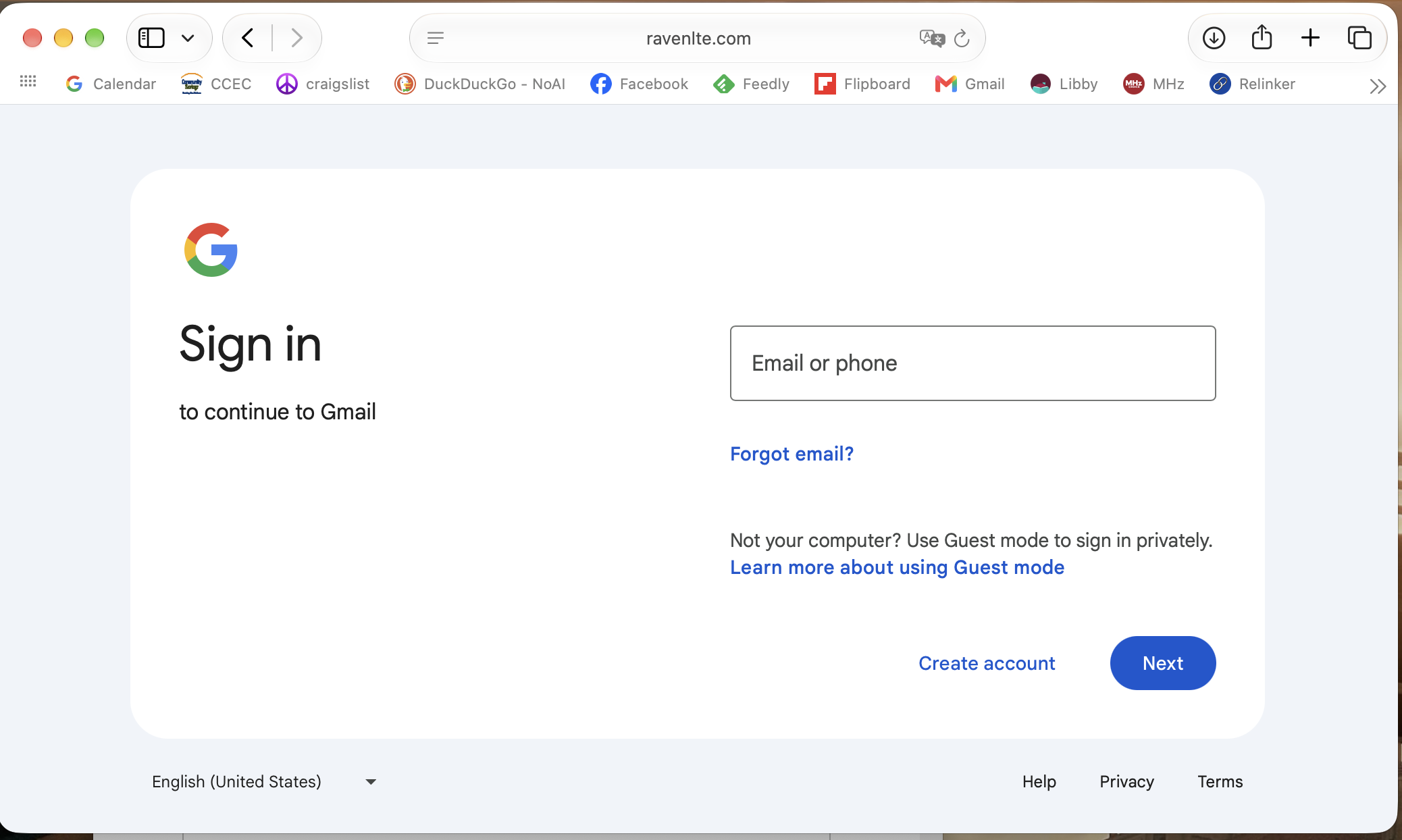
So that seems to explain what's going on - you receive a fake invitation from someone you know. You click on the link to see the invitation, and enter your Google/Gmail user name and password. You don't see an invitation, and close your browser, perhaps puzzled.
Behind the scenes, whoever is behind this scam logs into your Gmail account, sends out a new set of bogus invitations to everyone (!) in your email contact list, and changes your Google/Gmail password. All your contacts get the invitation from you, some of them click on the link, and the scam goes further and further.
A couple of things to note:
-- I've only received fake invitations from people with Gmail email addresses - and it seems like the scam is set up so that only people with Google accounts are being targetted. Gmail is currently the most popular email service, though.
-- I suspect (though I haven't verified) that the people who have sent me faux invitations had not set up 2 Factor Authentication (also referred to as 2FA or 2 Step Verification) on their Google accounts. If they had, when the random scammer tried to enter their user name and password to log into their Gmail account, the owner would have received some sort of notification - a text message to their cell phone # or a pop-up notification on one or all of their devices, asking whether they were trying to log on from some other location. Not receiving a 6-digit code number, the scammer would have been locked out, and not been able to use their account to send out more fake invitations or to change the user's Google password.
A piece that puzzles me, though:
-- where's the money? In the end, all these online scams are about money. I've seen many people, for instance, whose Facebook accounts have been (mostly) cloned or (much less often) hacked - the plot here, is that someone pretending to be you messages your Facebook friends with a somewhat credible account of why they need you to send them money, right now, to help you in an emergency. So far, nothing like that has happened to anyone I know - maybe it will sometime in the future. Let me know if you start getting suspicious emails from friends in need.
So what if it happens to you?
If you receive an invitation from someone you know, don't click on any links! Check first with the friend to see if they really did send you an invitation.
If you DID click on a link and then entered your Google user name and password, you've probably been hacked. Invitations have probably gone out to your friends and contacts claiming to be from you. And your Google/Gmail password may have been changed. (You may still be logged into Gmail and still able to send and receive email after this has happened, but if you log out and try to log on again, you won't be able to log in).
To check, go to accounts.google.com and try to log in. Maybe it will work - but maybe the password that your computer or device has saved won't work any longer.
In that case, you can use Google's Account Recovery process - best to do this on a computer or device that you own, ideally in a location where you've logged in before. After you enter your Gmail address, it may say that you can 'use a passkey to verify that it's really you'. This step confuses a lot of people. The passkey thing typically involves having saved a fingerprint or FaceID on your computer or device as a way of verifying your identity. You can give it a try. But maybe you haven't set that up.
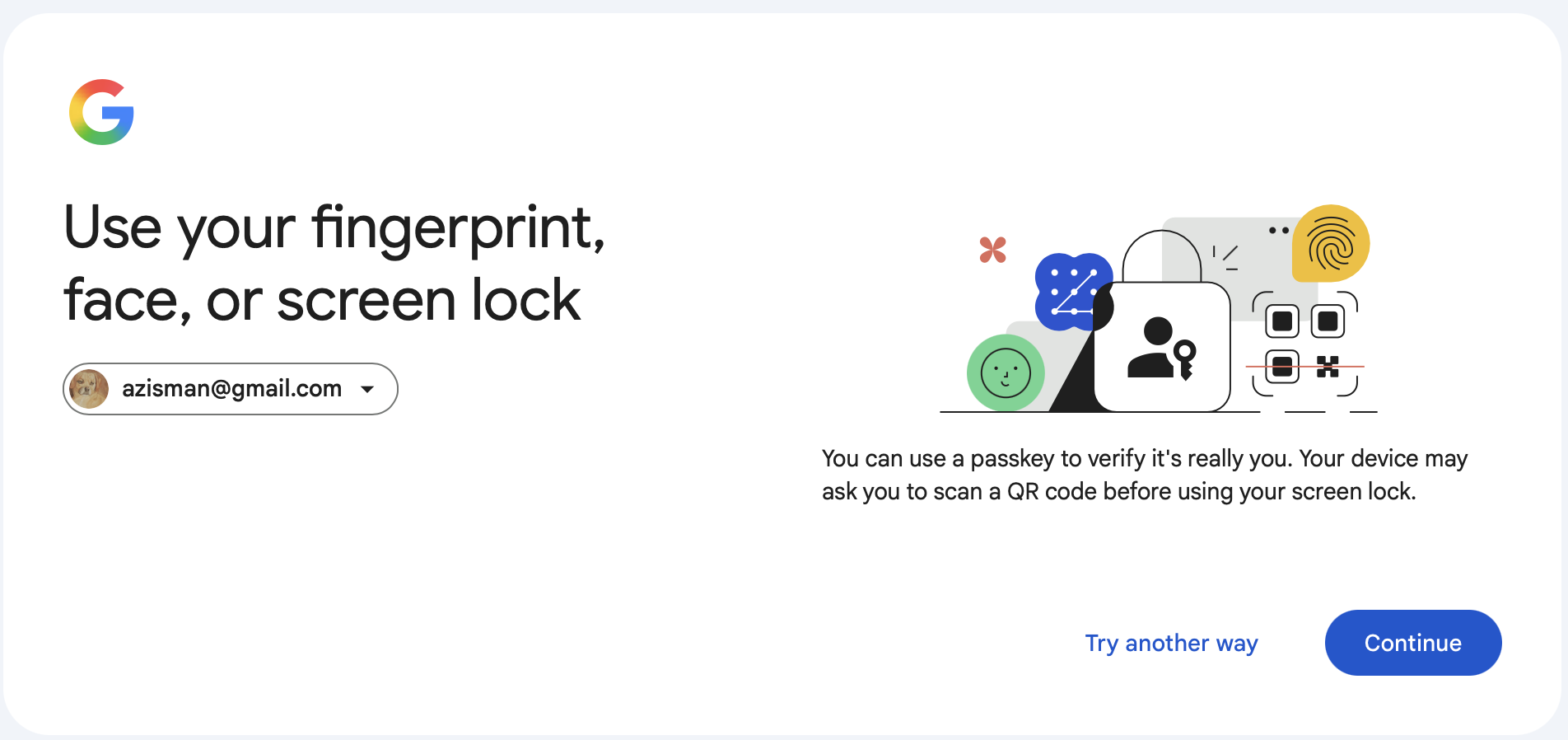
If your fingerprint, etc doesn't work, click on the Try Another Way option. Depending on how you set up your Google Account, you may get different options. Here's what I see:
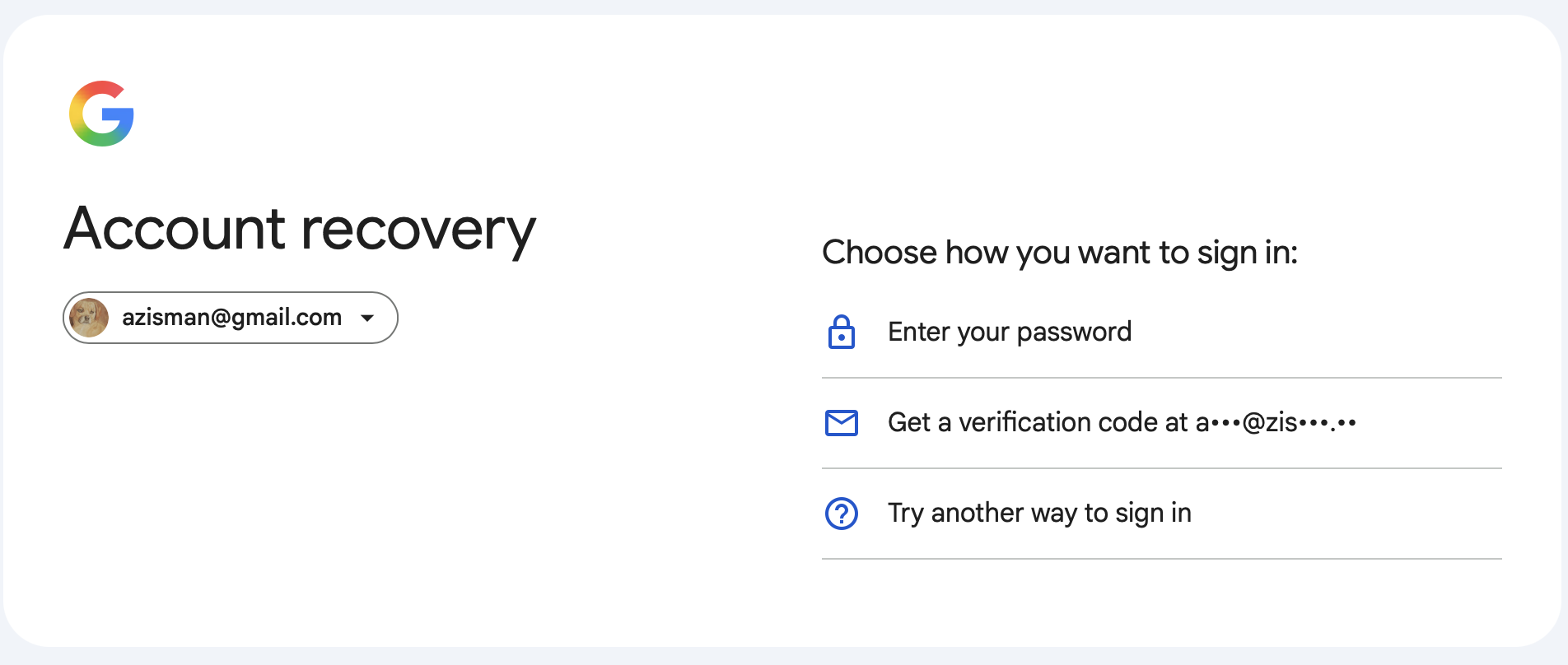
I have a backup email address on file, so I might ask for a verification code to be sent to that email address. Or I might ask for still other ways to verify.
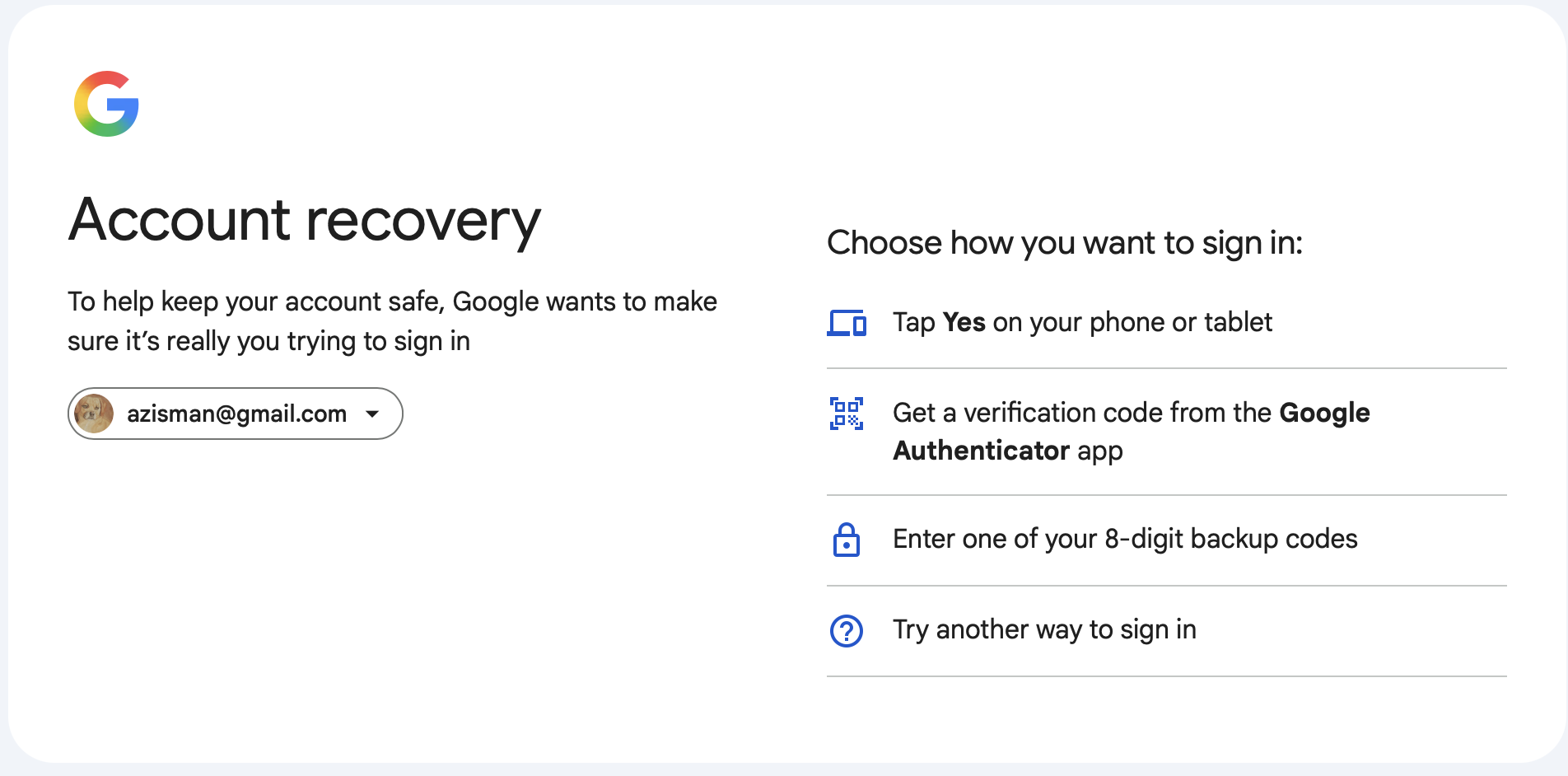
You might see an option to get a text message on your cell phone. Whatever! When you've verified that you're you, you'll get an option to change your Google Account password. (In some cases, Google may notify you that you will receive a link in 6 hours).
While you're fussing with your Google/Gmail passwords, take a moment to turn on 2 Factor Authentication (2 Step Verification). Open your Google Account, scroll down to Security & Sign-in, scroll down to How you sign in to Google and select Turn on 2-Step Verification. Follow the instructions.
If you just access your Gmail account in a web browser or a Gmail app on a phone or tablet, you may be done - though you may need to enter the new password on your phone or tablet or log out and back into Gmail on your computer.
If, however, you access your Gmail email using a different email program - Microsoft's Outlook or Apple Mail (on a Mac, iPhone, or iPad) for instance, you're not done yet - they won't know that if your password has changed, and may be trying to get and send mail using an older password that no longer works. For that you'll need specific instructions for whatever software (and device) you're using - and this article has gotten long enough.
Stay suspicious, stay safe. Enable 2-Factor Authentication.
Older blog postings....
Everyone loves an invitation, but....
By Alan Zisman © 2026-10-06
Like the title says, everyone loves an invitation. But recently, I started getting multiple email invitations from people I know, using a couple of different online invitation services. Here's an example (names blacked out):
I found this a little puzzling - call me paranoid, but if someone I know is inviting a bunch of people, I would hope that in the body of the email - or in the 'front page' of the invitation card, it might include some details. What am I being invited to? A party? For what occasion? Dinner? Or?
And where is it being held? Date? Time?
No, no information unless I click on the View Invitation button.
Since I'm naturally suspicious, I emailed the sender and asked whether they'd sent out an invitation.
The reply: 'Nope'.
After I got 3 or 4 similar invitations within a day or two from different people I knew (most of whom, I knew, are friends of one another, both online and in real life), I started to suspect something was going on.
And then, almost immediately, I started hearing from these same people that they were no longer able to log into their Google accounts. (I do casual tech support for friends, family, and acquaintances).
OK. Let's see what we can find out.
First, let's look 'below the fold' on the emailed invitation:
On a computer, in a web browser, if you hover your pointer over a link, you can see where the link is pointing - if I do that with the App Store, Google Play, Instagram (etc) buttons, they seem to point to the destinations we might expect. The Privacy Policy and other links on that line point to links at Evite.com as might be expected.
But the big button labelled View Invitation doesn't go to Evite.com - instead it goes some website named Ravenite.
Because I'm prepared to take some risks for my readers and for the people for whom I do tech support, I clicked the button anyway. It goes to what looks like a Google Account log in page, asking for my Google user name, and when I enter that, my password.
When other people got this invitation, many of them clicked on that button, saw what looked like a Google log in screen, and entered that information. But hold on a moment.
Why am I being asked to log into my Google account in order to view an invitation to a friend's party? At best, the party invitation service might want my email address in order to send me unwanted spam emails. But they don't need my Google password for that - just the address.
And if we look at the top of the web browser window, we see the address - it's not a Google log in page, again, it's a Ravenite page - apparently capturing my Google log in name and password:
So that seems to explain what's going on - you receive a fake invitation from someone you know. You click on the link to see the invitation, and enter your Google/Gmail user name and password. You don't see an invitation, and close your browser, perhaps puzzled.
Behind the scenes, whoever is behind this scam logs into your Gmail account, sends out a new set of bogus invitations to everyone (!) in your email contact list, and changes your Google/Gmail password. All your contacts get the invitation from you, some of them click on the link, and the scam goes further and further.
A couple of things to note:
-- I've only received fake invitations from people with Gmail email addresses - and it seems like the scam is set up so that only people with Google accounts are being targetted. Gmail is currently the most popular email service, though.
-- I suspect (though I haven't verified) that the people who have sent me faux invitations had not set up 2 Factor Authentication (also referred to as 2FA or 2 Step Verification) on their Google accounts. If they had, when the random scammer tried to enter their user name and password to log into their Gmail account, the owner would have received some sort of notification - a text message to their cell phone # or a pop-up notification on one or all of their devices, asking whether they were trying to log on from some other location. Not receiving a 6-digit code number, the scammer would have been locked out, and not been able to use their account to send out more fake invitations or to change the user's Google password.
A piece that puzzles me, though:
-- where's the money? In the end, all these online scams are about money. I've seen many people, for instance, whose Facebook accounts have been (mostly) cloned or (much less often) hacked - the plot here, is that someone pretending to be you messages your Facebook friends with a somewhat credible account of why they need you to send them money, right now, to help you in an emergency. So far, nothing like that has happened to anyone I know - maybe it will sometime in the future. Let me know if you start getting suspicious emails from friends in need.
So what if it happens to you?
If you receive an invitation from someone you know, don't click on any links! Check first with the friend to see if they really did send you an invitation.
If you DID click on a link and then entered your Google user name and password, you've probably been hacked. Invitations have probably gone out to your friends and contacts claiming to be from you. And your Google/Gmail password may have been changed. (You may still be logged into Gmail and still able to send and receive email after this has happened, but if you log out and try to log on again, you won't be able to log in).
To check, go to accounts.google.com and try to log in. Maybe it will work - but maybe the password that your computer or device has saved won't work any longer.
In that case, you can use Google's Account Recovery process - best to do this on a computer or device that you own, ideally in a location where you've logged in before. After you enter your Gmail address, it may say that you can 'use a passkey to verify that it's really you'. This step confuses a lot of people. The passkey thing typically involves having saved a fingerprint or FaceID on your computer or device as a way of verifying your identity. You can give it a try. But maybe you haven't set that up.
If your fingerprint, etc doesn't work, click on the Try Another Way option. Depending on how you set up your Google Account, you may get different options. Here's what I see:
I have a backup email address on file, so I might ask for a verification code to be sent to that email address. Or I might ask for still other ways to verify.
You might see an option to get a text message on your cell phone. Whatever! When you've verified that you're you, you'll get an option to change your Google Account password. (In some cases, Google may notify you that you will receive a link in 6 hours).
While you're fussing with your Google/Gmail passwords, take a moment to turn on 2 Factor Authentication (2 Step Verification). Open your Google Account, scroll down to Security & Sign-in, scroll down to How you sign in to Google and select Turn on 2-Step Verification. Follow the instructions.
If you just access your Gmail account in a web browser or a Gmail app on a phone or tablet, you may be done - though you may need to enter the new password on your phone or tablet or log out and back into Gmail on your computer.
If, however, you access your Gmail email using a different email program - Microsoft's Outlook or Apple Mail (on a Mac, iPhone, or iPad) for instance, you're not done yet - they won't know that if your password has changed, and may be trying to get and send mail using an older password that no longer works. For that you'll need specific instructions for whatever software (and device) you're using - and this article has gotten long enough.
Stay suspicious, stay safe. Enable 2-Factor Authentication.
Older blog postings....
| About This Blog... I've been writing about computers, software, Internet and the rest of technology since 1992, including a 17 year (1995-2012) stint as 'High Tech Office' columnist for Business in Vancouver. This blog includes thoughts on technology, society, and anything else that might interest me. Comments, emailed to alan@zisman.ca are welcome - and may be published in whole or part. You can follow me on Facebook for notice of new blog postings. |
 |